
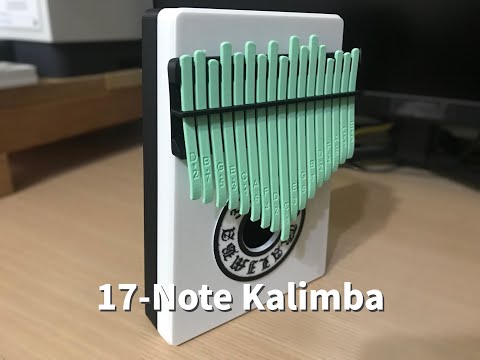
About the 17-key Kalimba
Kalimbas usually have steel tines. In this one every part is printed, including the 17 tines, which are plastic strips that slide in a printed bracket. Moving a tine in or out changes its vibrating length, and so its pitch, so you can tune the whole instrument with a tuner app. The range runs from C3 to E5, and the box underneath acts as the soundbox.
The design is laid out for neat assembly. Positioning pins line up the bracket with the upper soundbox while the glue sets, and the tines print with a brim that you keep on until you fit each one, so they stay straight and in order. Start with the long middle tine, the C, and work outwards. The tines aren't glued, because they have to slide for tuning.
Who it's for. Makers who'd like a pretty, gift-worthy instrument and are happy to spend time tuning. Plastic tines won't ring like steel. The designer's playing tip is to pluck gently, at a shallow angle, instead of pressing hard. Hear it in the video below.
Licence note. This model uses MakerWorld's Standard Digital File licence, so we link to its photos rather than copying them.
What you'll need
Printed parts
- Tine bracket (17 holes)
- Positioning pins
- Upper and lower soundbox
- 17 tines
- Decorative 'KALIMBA 3D PRINT' plate
Bought parts
- Glue (for the bracket, soundbox and plate; not for the tines)
- Optional: double-sided tape for the decorative plate
Tools
- Needle-nose pliers or a small flat screwdriver to seat the tines
- A tuner or tuning app
Build overview
- Print everything. Leave the brim on the tines for now.
- Glue the soundbox. Push the positioning pins into the upper soundbox, glue the bracket on and align it, then glue the lower soundbox.
- Fit the tines. Snap each tine off the brim as you go, starting with the centre C. Engraved side up, curved end facing out, push the other end into the bracket.
- Tune. Pluck each tine with a tuner running and slide it until it hits its target note; the designer lists the frequencies.
- Finish. Fix the decorative plate with glue or tape.
Video
 Play video: Full 3D print kalimba (loads YouTube)
The videos don't load from YouTube until you press play. Video thumbnails are © their creators.
Photos
The MakerWorld licence (MakerWorld Standard Digital File License) doesn't allow rehosting, so the photos stay on MakerWorld. See them on MakerWorld ↗