
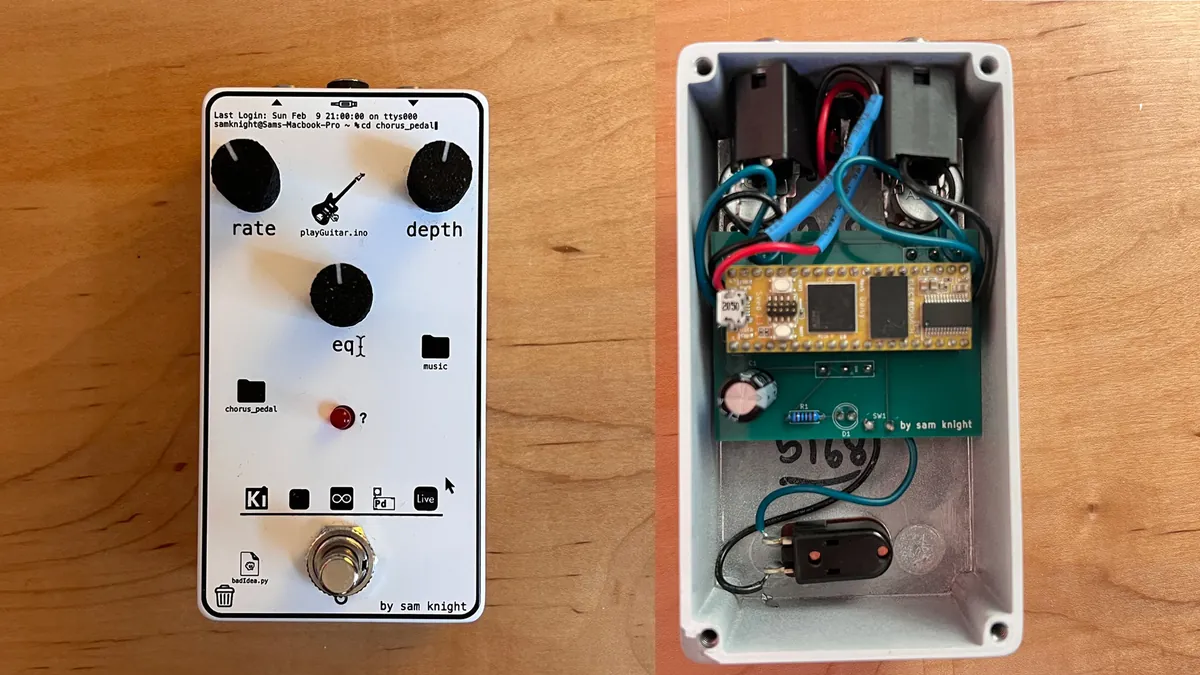
About the digital pedal course
This isn't plans for one particular pedal. Sam Knight's free course teaches the whole process of designing your own digital pedal, and builds a chorus pedal as the worked example. You start with a Daisy Seed (a small audio microcontroller board) on a breadboard, write simple hard- and soft-clipping distortion, then use the DaisySP library for effects.
The later episodes cover the hardware: planning the holes in an aluminium 125B enclosure, drawing the schematic and board in KiCad, checking the fit, ordering the circuit board, designing artwork for a UV-printed front, and soldering it all together. The GitHub repo has the code, the KiCad hardware files, a parts list and links for further learning.
The designer's parts list orders the enclosure, drilling and UV printing from Tayda Electronics and the board from PCBWay, but those are just his choices: the parts are ordinary, and the files work with any supplier.
Who it's for. Guitarists and makers who want to design their own pedals. The designer says it's aimed at beginners, but it helps to know basic programming and what a resistor is. Code and files are GPL-3.0. This page summarises the course; we haven't built one ourselves.
What you'll need
Bought parts
- A Daisy Seed board
- A 125B-size aluminium enclosure
- 3 × 10 kΩ linear potentiometers
- 2 × 1/4" mono jacks and a 2.1 mm DC power jack
- A soft-touch momentary footswitch
- Female pin headers, an LED and a 1 kΩ resistor
- A circuit board made from your KiCad design (the designer ordered five, the usual minimum)
Tools
- A computer for coding and KiCad (free)
- A breadboard and jumper wires for prototyping
- A soldering iron
- A drill, if you don't use a drilling service
Build overview
Our own outline of the 10 episodes. The repo with code and files is on GitHub.
- Picking parts (ep. 1). Set up the Daisy Seed on a breadboard with knobs and switches.
- Basic DSP (ep. 2). Write hard- and soft-clipping distortion in the audio callback.
- DaisySP (ep. 3). Use the library to build a chorus effect.
- Enclosure drilling plan (ep. 4). Lay out the holes for the enclosure.
- Schematic, footprints and layout (eps. 5–7). Draw the circuit in KiCad, make any missing footprints, and lay out a board that fits the enclosure.
- Review and order (eps. 8–9). Check the fit, order the board and parts, and design the front artwork.
- Final assembly (ep. 10). Solder it together, test it and finish the firmware.
Video
 Play video: The full course (loads YouTube)
Nothing loads from YouTube until you press play. Video thumbnails are © their creators.