
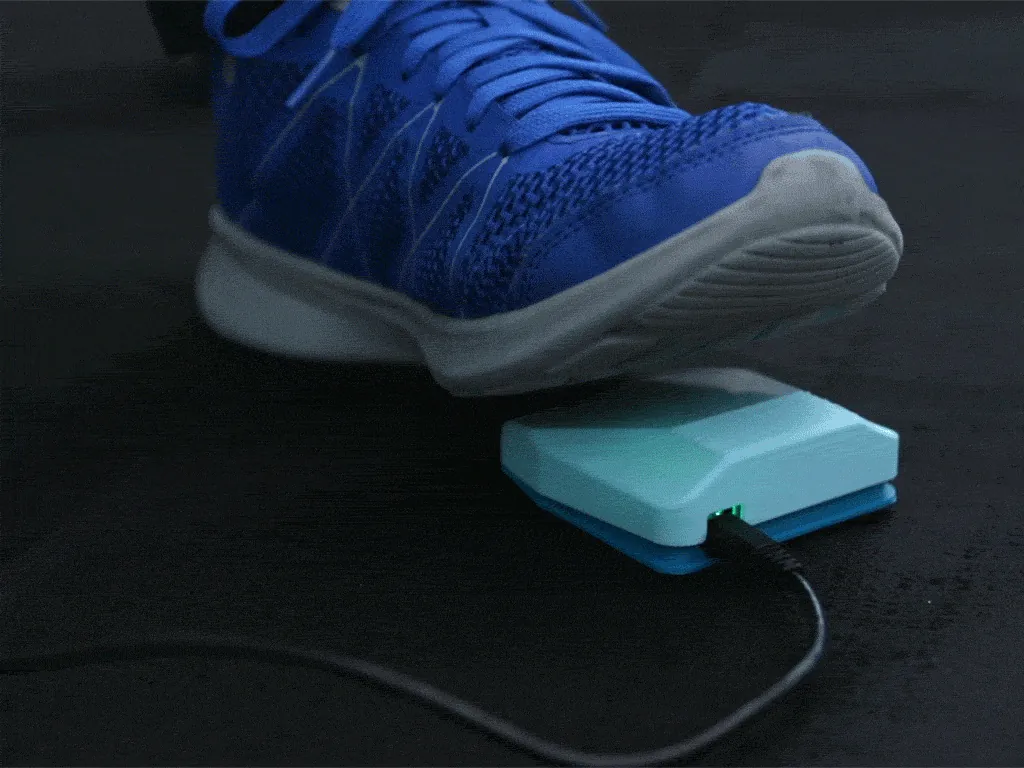
About the USB Foot Switch
The Ruiz Brothers at Adafruit designed this small hinged pedal around a Trinket M0 board and a micro switch. When you press it, the board acts as a USB keyboard and types a key. Adafruit built it to trigger a camera hands-free, but it works for anything that responds to a keypress.
Using it as a page turner. Out of the box the code sends Space. Change the keycode in code.py to Page Down or the right arrow (whichever your sheet-music app uses for the next page) and it becomes a hands-free page turner for a computer, or for a tablet that accepts a USB keyboard. Adafruit links the full list of keycodes. It's wired, so you'll need a cable to your device.
The parts are split up for easy printing. Adafruit printed them in PLA at 0.2 mm; only the top cover needs supports. Screws hold the switch on its bracket and the bracket on the base, the Trinket screws onto standoffs, and the top clicks on with printed hinges. The micro switch listed in the guide shows as no longer stocked, but the wiring uses only the standard common and normally-open terminals.
Licences. STLs CC BY 4.0 on Thingiverse; the code file carries an MIT licence header. We haven't built one ourselves; this is a summary of Adafruit's guide.
What you'll need
Printed parts
- Base
- Top cover (needs supports)
- Switch bracket
Bought parts
- Adafruit Trinket M0
- A 3-terminal micro switch
- 4 × M2.5 × 5 mm and 2 × #4-40 × 5/8" flat-head screws
- Two short lengths of thin silicone wire
- A micro-USB data cable
- Small springs (the guide lists a spring kit)
Tools
- A soldering iron
- Wire strippers and flush cutters
- A screwdriver
Build overview
Our own outline. The full guide with photos is on Adafruit Learn.
- Print the parts. Print the base, top cover (with supports) and bracket in PLA.
- Wire the switch. Solder the switch's common terminal to G on the Trinket and its normally-open terminal to pin 0.
- Load the code. Install CircuitPython, copy the project bundle and, for page turning, change Keycode.SPACE to your app's page-turn key.
- Assemble. Screw the switch to the bracket and the bracket to the base, screw the Trinket onto its standoffs, then press the top cover onto the hinges until it clicks.
Print settings
- Material: PLA
- Layers: 0.2 mm
- Line width: 0.38 mm
- Temperatures: 220 °C nozzle, 65 °C bed
- Supports: Top cover only
Video
 Play video: The foot switch in use (loads YouTube)
Nothing loads from YouTube until you press play. Video thumbnails are © their creators.