
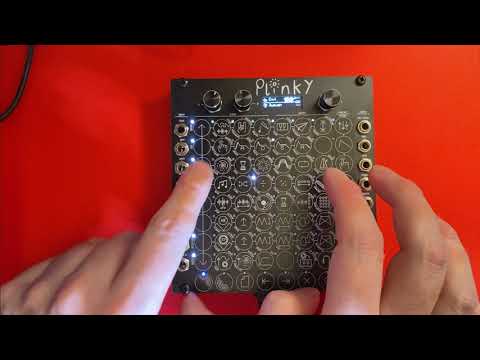
About the Plinky
Plinky is a small synthesiser by Alex Evans (mmalex) that, in his words, specialises in fragile, melancholic sounds. You play it on a touch-sensitive surface rather than a keyboard, and it has its own sequencer. It fits a 24HP Eurorack case, or plays standalone as a desktop mini-synth over CV or MIDI, powered by USB, with a stereo line input and a headphone output.
Fully open. The hardware is published under the permissive CERN-OHL-P v2 licence, the software under MIT and the graphics under CC BY-SA 4.0. The GitHub repo has the KiCad files and Gerbers for the main board and the front and back panels (which are circuit boards too), so you can have the boards made yourself. The main board uses surface-mount parts, so if you build from the files you'd likely have a board house fit them.
Plinky is also sold as a DIY kit with the surface-mount parts already fitted, and the official build guide is written for that kit: you solder the jacks, pots, encoder, headers and screen, then calibrate. A kit is optional; the files are free.
The latest firmware, 0.B3, came out on 19 August 2025. Who it's for. Synth players and makers who can solder carefully. This page summarises the official site, build guide and repo; we haven't built one ourselves.
What you'll need
Bought parts
- The main board, made from the published files (with the surface-mount parts fitted by a board house)
- The front and back panel boards, made from the published files
- Thonkiconn jacks, 2 × B10k pots, an encoder and knobs
- An OLED screen, two angled 2 × 8 headers, M3 standoffs and screws
Tools
- A soldering iron with a small tip and fine (0.5 mm) solder
- Snipe-nose pliers
- A multimeter
Parts from the V3 build guide's kit contents. Building from the raw files means ordering the boards yourself.
Build overview
Our own outline of the official V3 build guide.
- Prepare the main board. Snap off the assembly rails.
- Fit the headers. Solder the two angled 2 × 8 headers for Eurorack power and the optional expander.
- Place the front parts. Place the jacks, pots and encoder before soldering anything, then solder them.
- Add the screen. Fit the spacer and the OLED screen.
- Calibrate and update. Run the calibration and install the latest firmware.
Videos
 Play video: Build walkthrough (loads YouTube)
 Play video: Features and making a patch (loads YouTube)
The videos don't load from YouTube until you press play. Video thumbnails are © their creators.